
Uninstall Tool 3.8.1.5740 For Windows Download

Uninstall Tool 3.8.1.5740 for Windows is a lightweight yet powerful uninstallation utility designed to offer faster, cleaner, and more advanced uninstallation features than the standard Windows uninstallation manager. Developed as a professional alternative to Windows’ built-in “Add/Remove Programs” feature, the application focuses on comprehensive software uninstallation, startup management, installation monitoring, and system cleanup.
This software is especially popular with:
- Advanced Windows users
- IT technicians
- System administrators
- Gamers
- PC optimization enthusiasts
- Users who struggle with difficult-to-uninstall applications
One of Uninstall Tool’s key advantages is its ability to detect and remove residual registry entries, hidden applications, startup items, and corrupted uninstallation logs, which are often overlooked by standard Windows tools. The software also supports portable mode, batch uninstallation, installation monitoring, and startup management.
Uninstall Tool 3.8.1.5740 is designed to improve system maintenance while helping users free up storage space and reduce software clutter. Its lightweight design and fast scanning engine make it particularly appealing to users looking for an efficient uninstaller without the complexity of larger system optimization software.
In this detailed review, we’ll explore the main features, latest updates, system requirements, pros and cons, performance, community reviews, and overall user experience of Uninstall Tool 3.8.1.5740 for Windows.
Key Features of Uninstall Tool 3.8.1.5740:
Complete Software Removal
The main feature of Uninstall Tool is its ability to completely remove software installed on Windows systems.
Unlike the standard Windows uninstaller, this software scans for:
- Remaining registry entries
- Remaining folders
- Hidden files
- Corrupted uninstallation data
- Residual files at startup
The application uses technologies such as:
- The uninstallation wizard
- Installation tracking
- The installation monitor
This helps ensure a cleaner software uninstallation.
Fast uninstallation engine
Uninstall Tool is optimized for speed and efficiency.
According to official descriptions, the software is up to three times faster than the standard Windows “Add/Remove Programs” utility.
Its lightweight architecture allows for:
- Reduced scan times
- Increased responsiveness
- Faster cleanup operations
The application is therefore compatible with both older and newer systems.
Forced uninstallation functionality
One of the most notable features of the uninstallation tool is its forced uninstallation capability.
Users can uninstall:
- Corrupted applications
- Corrupted software
- Missing uninstallers
- Incomplete installations
This feature is especially useful when Windows fails to uninstall applications normally.
Problems with applications displaying incorrectly in Windows uninstallation lists or corrupted uninstallers are frequently discussed in forums.
Installation Monitoring and Tracking
The installation tracking feature monitors software installations in real time.
It records:
- Registry changes
- File creation
- Folder changes
- System settings
This allows for more accurate subsequent uninstallations, as the software knows exactly what changes were made during installation.
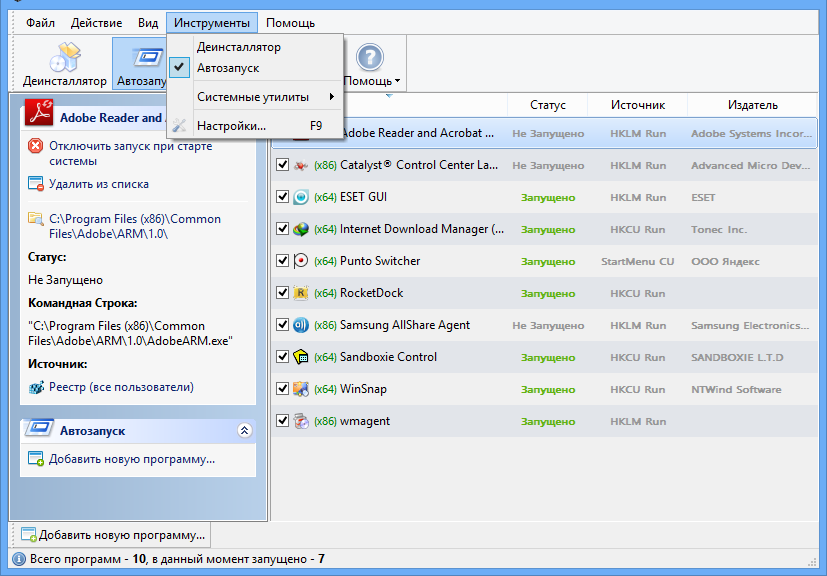
Startup Program Management
The uninstallation tool also includes tools for managing startup programs.
Users can:
- Disable startup applications
- Remove unnecessary startup entries
- Improve startup performance
- Manage startup programs
This improves overall Windows performance and startup speed.
Batch uninstallation support
The software supports batch uninstallation operations.
Users can:
Remove multiple programs simultaneously
- Automate uninstallation workflows
- Simplify cleanup tasks
This is especially useful for:
- IT maintenance
- Enterprise environments
- System optimization
- Large-scale software cleanup sessions
What’s New in Uninstallation Tool 3.8.1.5740?
Optimized Application Size
The latest updates have reduced the overall application size, making it even lighter and faster.
Improvements:
- Fastest Startup Speed
- Portability
- Efficient Resource Usage
- Updated Translation Support
Version 3.8.1.5740 offers updated multilingual translations for improved international usability.
Improved accessibility for users worldwide.
The latest updates have fixed icon display issues on Retina and high-resolution displays.
Improved visual clarity on:
- 4K displays
- High-resolution monitors
- Recent laptops
Improved installation tracking
The latest version improves:
- Installation tracking accuracy
- Registry detection
- Cleanup accuracy
- Residual file analysis
These improvements speed up software uninstallation.
Enhanced Windows 11 compatibility
Version 3.8.1.5740 improves compatibility with:
- Windows 11
- Updated system components
- Modern application frameworks
This helps maintain stable operation on current versions of Windows.
Stability improvements and bug fixes
Recent versions also fix:
- Boot management errors
- Improved UI responsiveness
- Registry cleanup errors
- Laptop mode stability
These changes improve overall reliability.
Screenshot:
System Requirements
Minimum System Requirements
For optimal performance of Uninstall Tool 3.8.1.5740, your system will generally need the following:
- Operating System: Windows XP, Vista, 7, 8, 10, or 11
- Processor: 1 GHz processor or minimum
- RAM: 2 GB or minimum
- Disk Space: Approximately 200 MB of free space
Additional Requirements:
Administrator privileges are recommended
Recommended Configuration
For smoother operation and optimal scanning performance, the following configuration is recommended:
- Operating System: Windows 10 or Windows 11
- Processor: Multi-core processor
- RAM: 4 GB or more
- Storage: SSD recommended
Advantages and Disadvantages of Uninstall Tool 3.8.1.5740:
Advantages:
Complete Software Removal
- Effectively removes residual files and registry entries.
Lightweight and Fast
- Minimal system resource consumption.
Portable Mode
- Ideal for technicians and mobile work environments.
Forced Uninstallation Function
- Useful for persistent or faulty software.
Boot Management
- Improves Windows startup performance.
Batch Uninstallation
- Effective for large-scale cleanup tasks.
Intuitive Interface
- Simple and accessible design.
Disadvantages
- Some advanced features require experience.
- Registry cleaning options can be confusing for beginners.
- Limited Additional System Optimization Tools
- Primarily focuses on uninstallation, rather than comprehensive PC optimization.
Conclusion
Uninstall Tool 3.8.1.5740 for Windows is a lightweight and powerful uninstallation utility designed to offer faster, cleaner, and more advanced uninstallation than the standard Windows uninstallation manager. With features such as forced uninstallation, installation tracking, startup management, portable mode, batch uninstallation, and residual file cleanup, this software is an excellent solution for maintaining a clean and optimized Windows environment.





Leave a Reply