
K-Lite Codec Pack 19.7.0 For Windows Download

K-Lite Codec Pack 19.7.0 for Windows continues this tradition by offering an updated and optimized collection of codecs, filters, audio decoders, video rendering engines, and playback utilities designed to improve multimedia compatibility on Windows systems. This software is particularly appreciated for its lightweight design, stability, advanced customization options, and broad compatibility with modern multimedia formats.
One of the main advantages of K-Lite Codec Pack is that it simplifies multimedia playback by grouping all the essential codecs into a single, easy-to-install package. Instead of searching for individual decoders and filters, users can install a complete multimedia solution compatible with virtually all major media formats.
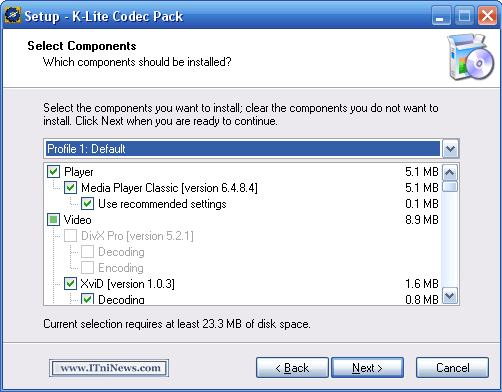
The K-Lite Codec Pack is available in several editions:
- Basic
- Standard
- Complete
- Mega
These editions offer different levels of functionality to suit various user needs. The pack also includes Media Player Classic Home Cinema (MPC-HC), one of the lightest and most powerful media players for Windows.
Version 19.7.0 introduces updated codecs, improved compatibility, bug fixes, and playback optimizations that enhance compatibility with modern media standards and the Windows environment.
Key Features of the K-Lite Codec Pack 19.7.0:
Extensive Media Format Support
One of the key strengths of the K-Lite Codec Pack is its broad media format compatibility.
The software supports a wide range of formats, including:
- MKV
- MP4
- AVI
- MOV
- FLV
- WEBM
- MPEG
This broad compatibility allows you to play virtually any media file without needing to install additional codecs.
Classic Home Cinema Media Player (MPC-HC)
Most editions of the K-Lite Codec Pack include the Classic Home Cinema Media Player.
MPC-HC is a lightweight media player distinguished by:
- Fast performance
- Low resource consumption
- Excellent compatibility
- Hardware acceleration support
- Subtitle integration
- Advanced playback controls
The player is compatible with both modern and legacy media formats.
Hardware-accelerated video playback
The K-Lite Codec Pack supports hardware acceleration technologies that improve playback efficiency.
Supported technologies:
- DXVA
- NVIDIA CUDA
- Intel Quick Sync
AMD hardware acceleration
Hardware acceleration allows you to:
- Reduce CPU usage
- Improve 4K playback
- Optimize streaming performance
- Decrease power consumption
This is especially useful for playing high-resolution media content.
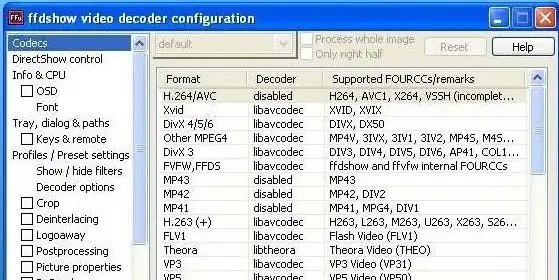
Advanced codec settings
The software offers advanced configuration tools for experienced users.
Users can:
- Configure video decoders
- Adjust audio filters
- Select preferred separators
- Customize rendering methods
- Adjust subtitle behavior
This flexibility makes the codec pack suitable for advanced multimedia environments.
Subtitle Support
The K-Lite codec pack includes full subtitle support.
Supported subtitle formats:
- SRT
- ASS
- SSA
- SUB
- IDX
Users can:
- Customize subtitle appearance
- Synchronize subtitles
- Adjust fonts and colors
- Load external subtitle files
This enhances the viewing experience for international content and anime.
Frequent Codec Updates
The codec pack receives regular updates to improve:
- Format compatibility
- Security
- Playback stability
- Decoder performance
Version 19.7.0 includes updated codec components and filtering improvements for the latest multimedia standards.
What’s New in K-Lite Codec Pack 19.7.0
Updated Codec Components
Version 19.7.0 includes the following updates:
- LAV Filters
- MPC Video Rendering Module
- Media Player Classic Components
- Audio Decoders
- Subtitle Filters
These updates improve playback quality and compatibility.
Improved 4K and HDR Playback
This latest version improves compatibility with the following formats:
- 4K Video
- HDR Content
- HEVC Decoding
- AV1 Playback
- Broadband Streaming
These optimizations enhance the modern multimedia playback experience.
Improved Windows 11 Compatibility
K-Lite Codec Pack 19.7.0 improves compatibility with:
- Windows 11
- Updated Graphics Drivers
- Modern Rendering Systems
This ensures stable operation in current Windows environments.
Improved Hardware Acceleration
Recent updates optimize GPU acceleration for:
- NVIDIA graphics cards
- AMD GPUs
- Intel integrated graphics cards
These improvements reduce playback lag and increase efficiency.
Improved Subtitle Rendering
The latest version improves:
- Subtitle synchronization
- Font rendering
- ASS subtitle support
- Multilingual subtitle support
This improves viewing workflows that require numerous subtitles.
Stability Improvements and Bug Fixes
Version 19.7.0 also fixes:
- Unexpected crashes during playback
- Codec conflicts
- Video rendering issues
- Audio sync issues
These fixes improve overall reliability.
Screenshots:
System Requirements:
Minimum System Requirements:
For optimal performance of K-Lite Codec Pack 19.7.0, your system will generally need the following:
- Operating System: Windows 7, 8, 10, or 11
- Processor: 1 GHz minimum
- RAM: 2 GB minimum
- Disk Space: Approximately 200 MB of free space
- Graphics Card: DirectX compatible graphics card
Recommended Configuration
For smoother playback and compatibility with high-resolution media, the following configuration is recommended:
- Operating System: Windows 10 or Windows 11
- Processor: Multi-core processor
- RAM: 4 GB or more
- Graphics Card: Dedicated graphics card with hardware acceleration
- Storage: SSD recommended
Advantages and Disadvantages of K-Lite Codec Pack 19.7.0:
Advantages:
- Compatible with virtually all major media formats.
- Efficient resource utilization and fast playback.
- Improves high-resolution video playback.
- Reliable and lightweight media player.
- Advanced subtitle support and customization.
- Ensures compatibility with modern media formats.
Disadvantages:
- Advanced settings can be confusing for beginners.
- Some features require technical knowledge.
- Codec packs are less necessary for casual users.
- Potential conflicts with existing codec installations.
Conclusion:
K-Lite Codec Pack 19.7.0 for Windows is a powerful yet lightweight multimedia codec suite designed to optimize audio and video playback compatibility on Windows. With its broad support for multimedia formats, advanced hardware acceleration, subtitle integration, modern rendering technologies, and the included MPC-HC player, this software remains one of the best codec solutions available for Windows users.





Leave a Reply