
DAEMON Tools Lite 12.6.0.2451 For Windows Download

DAEMON Tools Lite 12.6.0.2451 for Windows is one of the most popular disk imaging and virtualization applications on the market. Known for its lightweight design and reliability, this software allows you to mount disk image files, create virtual drives, burn discs, and manage various image formats from a centralized interface. Over the years, DAEMON Tools Lite has earned a solid reputation among gamers, IT professionals, software testers, and advanced PC users thanks to its flexibility and ease of use.
The software supports a wide range of image formats, including:
- ISO
- MDX
- MDS
- NRG
- VHD
- VMDK
This broad compatibility makes it ideal for both everyday users and advanced virtualization tasks.
DAEMON Tools Lite is especially useful for:
- Mounting ISO images
- Running older software
- Installing discless games
- Creating virtual drives
- Burning image files
- Managing digital backups
- Accessing archived software
Unlike other, more complex virtualization suites, the Lite edition focuses on the essential functions of virtual drives, maintaining a clean interface and low system resource consumption. Despite its lightweight design, the application includes several advanced features, such as image creation, USB tools, basic burning, and image organization.
In this detailed review, we’ll explore the main features, latest updates, system requirements, advantages and disadvantages, performance, community feedback, and overall user experience of DAEMON Tools Lite 12.6.0.2451 for Windows.
Key Features of DAEMON Tools Lite 12.6.0.2451:
Virtual Drive Emulation
The main feature of DAEMON Tools Lite is its powerful virtual drive emulation system.
The software allows you to create:
- DT virtual drives
- SCSI virtual drives
- Virtual optical drives
Users can directly mount image files without needing physical CDs, DVDs, or Blu-ray discs.
Support for a wide range of image formats
DAEMON Tools Lite supports numerous image formats, including:
- ISO
- MDX
- MDS/MD
This broad compatibility allows users to work with virtually all common disc image types.
Mounting ISO and Image Files
The software greatly simplifies mounting ISO files.
Users can:
- Double-click image files
- Drag and drop images
- Mount multiple images simultaneously
- Organize mounted devices
Mounted images appear in Windows Explorer as physical discs.
Imaging Tools
DAEMON Tools Lite includes tools for creating image files from physical discs.
Users can create:
- ISO Images
- MDX Images
- MDS Images
Disc Burning Functionality
The software also includes basic burning functions.
Users can:
- Burn ISO images
- Create bootable disks
- Create backup disks
- Burn media files
While the Lite edition isn’t as advanced as DAEMON Tools Ultra, it offers useful burning features for everyday use.
Bootable USB Drive Creator
DAEMON Tools Lite includes tools for creating bootable USB drives.
Users can:
- Write system images
- Create recovery drives
- Create installation media
- Prepare bootable USB drives
What’s New in DAEMON Tools Lite 12.6.0.2451
Improved Windows 11 Compatibility
Version 12.6.0.2451 improves compatibility with:
- Windows 11
- Updated Windows drivers
- Modern security systems
These changes improve stability and compatibility with current Windows versions.
Improved Image Mounting Stability
Recent updates optimize:
- Virtual drive reliability
- Mounting speed
- Image detection
- Driver compatibility
These improvements reduce mounting errors and optimize performance.
Improved USB Flash Drive Creation
This latest version improves:
- Creation of bootable USB flash drives
- GPT and UEFI support
- Recovery media management
- USB flash drive detection
This significantly improves deployment workflows.
User Interface Improvements
Version 12.6.0.2451 includes improvements to:
- Navigation
- Device Management
- Image Library Organization
- High-Resolution Display Support
These improvements optimize usability on modern systems.
Performance Optimization
Recent updates improve:
- Boot Speed
- Efficient Memory Usage
- Device Responsiveness
- Background Operations
These changes make the software run more smoothly and perform better.
Stability Improvements and Bug Fixes
This latest version also fixes:
- Driver Conflicts
- Image Loading Issues
- USB Write Issues
- Virtual Device Recognition Errors
These fixes improve long-term reliability.
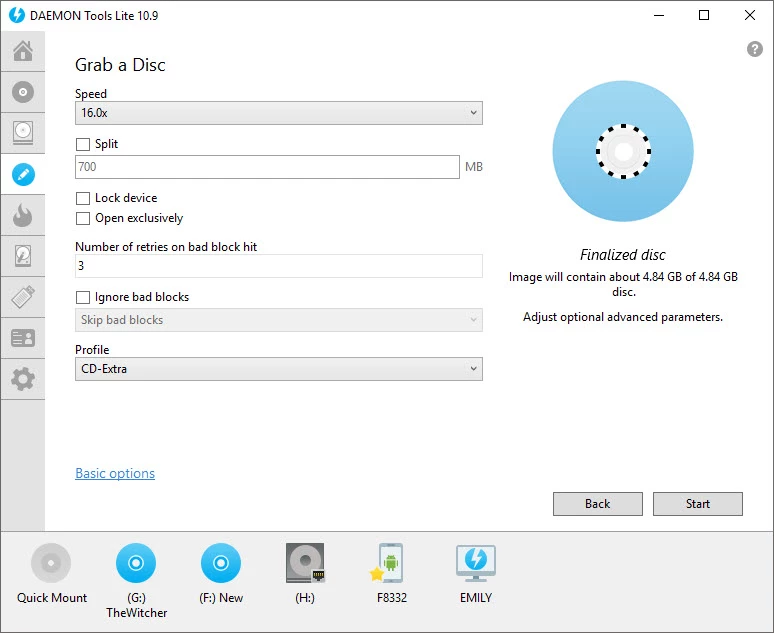
Screenshot:
System Requirements:
Minimum System Requirements
For optimal performance of DAEMON Tools Lite 12.6.0.2451, your system will generally require the following:
- Operating System: Windows 7 or later
- Processor: 500 MHz minimum
- RAM: 1 GB minimum
- Disk Space: Approximately 100 MB of free space
Additional Requirements:
Administrator privileges are required for driver installation
Recommended Configuration
For smoother operation and advanced multimedia workflows, the following configuration is recommended:
- Operating System: Windows 10 or Windows 11
- Processor: Multi-core processor
- RAM: 4 GB or more
- Storage: SSD recommended
Additional Hardware:
USB 3.0 support for faster bootable media creation
Advantages and Disadvantages of DAEMON Tools Lite 12.6.0.2451:
Advantages”
- Excellent image format compatibility
- Compatible with numerous virtual disk formats.
- Quick and easy image management.
- Efficient use of system resources.
- Tools for bootable USB drives
- Useful for operating system installation.
Disadvantages
- Some advanced features are reserved for Premium editions.
- Some professional tools require higher editions.
- Virtual device drivers may cause problems for some users.
- Infrequent conflicts may occur with security software or anti-cheat systems.
- Some features may be unnecessary for occasional users.
- Some tools may be overkill for users who only mount ISO files occasionally.
Conclusion:
DAEMON Tools Lite 12.6.0.2451 for Windows is a reliable and comprehensive utility for creating disk images and virtual drives. It is designed for users who need efficient ISO mounting, image creation, virtual drive emulation, and management of bootable USB drives. Thanks to its broad compatibility with image formats, its lightweight design, stable virtualization tools, and intuitive user interface, this software remains one of the best virtualization applications available for Windows.





Leave a Reply