
ReaConverter Pro 8.0.221 For Windows Download

ReaConverter Pro 8.0.221 for Windows is an advanced image and file batch conversion software designed to efficiently automate large-scale file processing. It supports over 700 file formats and combines powerful conversion tools with editing, automation, scripting, and workflow management features.
Unlike many standard image converters, reaConverter Pro focuses on automation and professional workflows. It includes monitored folders, command-line support, batch editing tools, and integration features that allow users to process large collections of files with minimal manual intervention.
Whether you’re a photographer managing RAW files, a graphic designer working with vector graphics, an engineer converting CAD drawings, or a business processing thousands of documents daily, reaConverter Pro 8.0.221 offers a complete and highly customizable workflow solution.
Main Features of ReaConverter Pro 8.0.221 For windows:
Advanced Batch Conversion:
ReaConverter Pro specializes in large-scale batch file conversion.
Users can:
- Convert thousands of files simultaneously
- Process entire folders
- Apply adjustments in bulk
- Ensure consistent output quality
- Automate repetitive tasks
This software is specifically designed to handle large volumes of files and professional automation workflows.
This allows businesses and professionals to save valuable time every day.
Built-in Batch Processing Tools:
As a conversion tool, reaConverter Pro offers comprehensive image editing features.
Users can apply the following functions:
- Resize
- Crop
- Rotate
- Add watermarks
- Color correction
- Adjust brightness
- Adjust contrast
- Sharpen
- Border effects
- Edit metadata
These editing tools can be automatically applied to large batches of files simultaneously.
Therefore, it is no longer necessary to edit each file individually.
Automatic folder monitoring:
One of the key features of reaConverter Pro is automatic folder monitoring.
Users can configure folders that automatically perform the following operations:
- Detection of incoming files
- Application of predefined workflows
- Instant format conversion
- Automatic export of processed files
Official information highlights folder monitoring as one of the main automation features of reaConverter 8 Pro.
This feature is especially useful for:
- Print shops
- Design agencies
- Automated server environments
- Enterprise workflows
- High-volume production systems
Command-line and script support:
The Pro edition includes advanced command-line features designed for professional automation.
Features:
- Multithreaded command-line interface support
- Script integration
- Automated workflows
- Server-side processing
- Third-party software integration
- DLL integration support
According to official information, the Pro version is specifically designed for users who need professional image processing automation.
This makes reaConverter an invaluable tool for developers and enterprise IT environments.
Windows Explorer Integration:
reaConverter integrates directly with Windows Explorer.
Users can:
- Right-click on files
- Start conversions instantly
- Apply saved presets
What’s New in ReaConverter Pro 8.0.221 For Windows?
Expanded Format Compatibility:
Version 8 significantly expands compatibility with both modern and legacy file formats.
This latest version improves handling of the following formats:
- RAW Image Formats
- CAD Files
- Vector Graphics
- Medical Image Formats
- Office Document Conversion
Official announcements highlight compatibility with over 700 formats in ReaConverter 8 Pro.
Enhanced Automation of Monitored Folders:
This latest version introduces improved folder monitoring functionality, with:
- Improved monitoring stability
- Faster file detection
- Enhanced workflow automation
- Optimized network folder management
These improvements simplify automated processing workflows.
Enhanced Multithreaded Command-Line Interface:
ReaConverter 8 Pro enhances the command-line interface with:
- Multithreaded execution
- Improved event logging
- Enhanced automation scripts
- Faster enterprise processing
This significantly improves performance in automated server environments.
Improved Windows 11 Compatibility:
The latest version improves compatibility and optimization for:
- Windows 11
- Modern processors
- High-resolution displays
- Multi-monitor setups
These updates improve overall usability and stability.
User Interface Improvements:
Version 8 also introduces interface improvements, including:
- More intuitive navigation
- Optimized batch workflow management
- Faster preset management
- Improved usability for large-scale projects
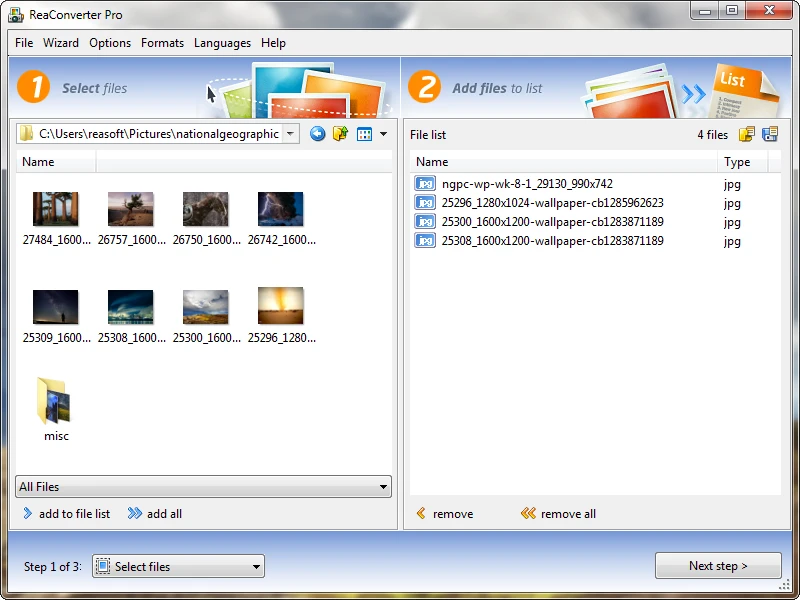
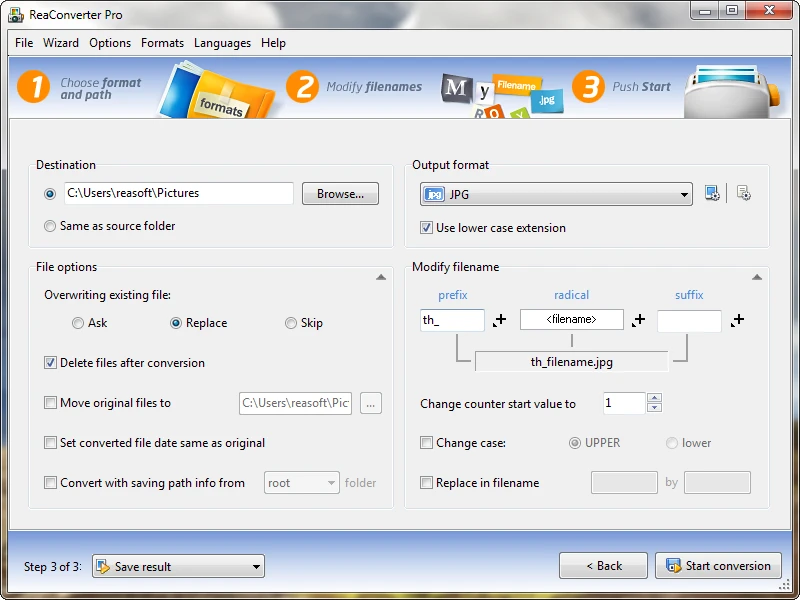
The updated interface is more modern and streamlined than previous versions.
Screenshots:
System Requirements:
Minimum System Requirements:
For reaConverter Pro 8.0.221 to function correctly, users must meet the following minimum system requirements:
- Operating System: Windows 7, 8, 10, or 11
- Processor: Intel or AMD processor
- RAM: 2 GB RAM
- Disk Space: 800 MB available space
- Display: 1280 × 720 resolution
Several download lists confirm compatibility with modern Windows systems with moderate hardware requirements.
Recommended Configuration:
For professional batch processing and enterprise workflows, the following configuration is recommended:
- Operating System: Windows 11 (latest version)
- Processor: Intel Core i7/i9 or AMD Ryzen multi-core processor
- RAM: 8 GB or more
- Storage: SSD or NVMe drive recommended
- Graphics Card: High-resolution display support
Adhering to the recommended configuration improves conversion speed and batch workflow performance.
Pros and Cons of ReaConverter Pro 8.0.221 For windows:
Pros:
- Extensive Format Compatibility
- The software supports over 700 file formats.
- High-Performance Batch Processing
- Large file conversion is extremely efficient.
- Powerful Automation Features
- Watchlist folders and command-line tools significantly enhance workflow automation.
- Offline Conversion
- Files remain secure without needing to be uploaded to the cloud.
- Professional Editing Tools
- Built-in editing features reduce reliance on external software.
- Windows Explorer Integration
- Right-click conversion enhances productivity.
- Ideal for Professional Workflows
Advanced automation makes the software ideal for professional environments.
Disadvantages:
Large Installation Size
The software is relatively large due to its extensive format compatibility.
Advanced Features Can Be Difficult to Learn
Automation and scripting tools can be complex for beginners.
Premium Software
The Pro edition requires a paid license.
The interface may appear technical.
Some users may find the professional workflow less intuitive for beginners than that of simpler converters.
Conclusion:
ReaConverter Pro 8.0.221 For Windows is a powerful and highly flexible platform for batch file conversion and automation, designed for professional Windows users. Supporting over 700 file formats, with advanced batch editing tools, monitored folder automation, scripting, and offline processing, reaConverter Pro 8.0.221 is the ideal solution for photographers, designers, engineers, businesses, and professional environments.





Leave a Reply