
Aseprite For WindowsAseprite 1.3.17.2 For Windows Download

Aseprite 1.3.17.2 is a professional pixel art and sprite animation editor designed specifically for artists, game developers, animators, and hobbyists. Developed by Igara Studio, Aseprite has become one of the most widely used pixel art applications in the indie game community thanks to its streamlined workflow, powerful animation tools, tile-map compatibility, scripting capabilities, and intuitive interface.
Unlike traditional image editors, Aseprite is built from the ground up to create highly detailed artwork. It offers specialized tools for creating sprites, character animations, tile sets, visual effects, UI elements, and game-ready graphics, allowing precise control over every pixel.
Version 1.3.17.2 is a maintenance update that improves stability and fixes specific issues related to tile maps and zoom level rendering, while building upon the many improvements introduced in the Aseprite 1.3 series.
Key Features of Aseprite 1.3.17.2:
Specialized Pixel Art Editor
Aseprite is designed specifically for pixel art.
Its main strengths are:
- Pixel-by-pixel drawing
- Clean rendering
- Precise editing tools
- Palette-based workflow
- Retro art creation
The interface is optimized for pixel artists, not general graphic designers.
Advanced Sprite Animation
Animation is one of Aseprite’s most important features.
Users can create:
- Character animations
- Effect animations
- Walk cycles
- Attack animations
- User interface animations
- Cinematic scenes for games
Tile map support
Version 1.3 introduced powerful tile map editing capabilities.
Users can:
- Create tile sets
- Design maps
- Effectively reuse tiles
- Create game environments
- Manage level graphics
Layers and Layer Groups
Aseprite supports professional layer management.
Features:
- Multiple Layers
- Layer Groups
- Blending Modes
- Opacity Controls
- Layer Locking
These tools help artists efficiently organize complex projects.
Color Palette Management
The software includes comprehensive palette management tools.
Features:
- Custom Palettes
- Indexed Color Workflow
- Palette Exchange
- Retro Console Palettes
- Color Organization
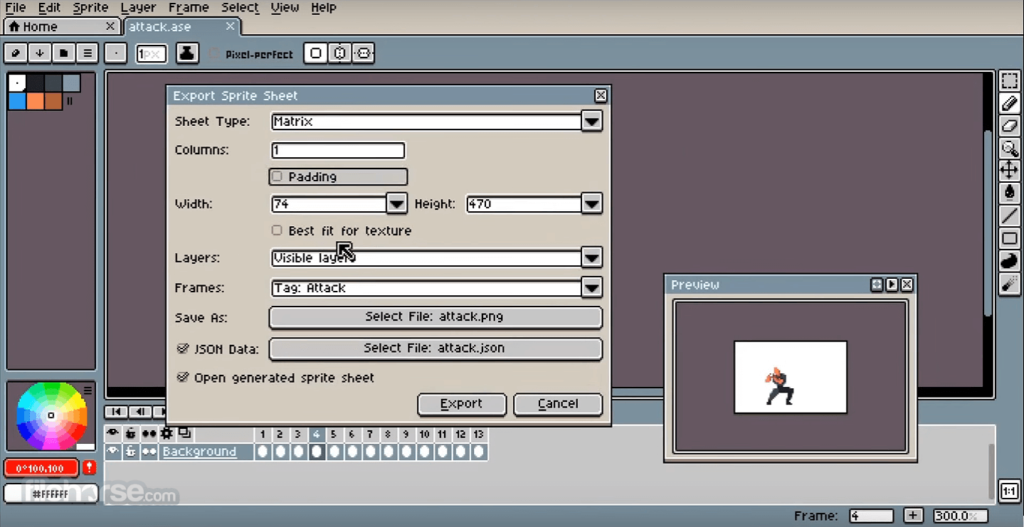
Tile Sets and Sprite Sheets
Aseprite lets you export production-ready assets.
Supported Output Formats:
- Sprite Sheets
- Animation Sequences
- Tile Sets
- PNG Sequences
- GIF Animations
New features in version 1.3.17.2?
Fixed tile selection issue
Version 1.3.17.2 fixes an issue that prevented individual tiles from correctly selecting map layers in tile mode. This improves reliability when editing game maps and tile-based graphics.
Fixed layer distortion at 20% zoom
This update fixes a display issue that caused layer distortion when viewing charts at a 20% zoom level. This improves visual accuracy during editing and review.
Additional improvements in version 1.3
Aseprite For Windows Version 1.3.17 introduced the following new features:
- Expanded memory management options
- Improved behavior when renaming layers
- Fixed several bugs that caused unexpected crashes
- Greater stability
- Updated Lua API support
These improvements are still available to users of version 1.3.17.2.
System requirements:
Minimum system requirements
- Operating system: Windows 10, Windows 11
- Processor: 64 bit processor
- RAM: 4 GB
- graphics card: OpenGL compatible graphics hardware
- Disk space: Approximately 250 MB of available space
Aseprite is lightweight and works perfectly even in modest systems.
Recommended settings
- Processor: Modern multicore processor
- RAM: 8 GB or more
- Storage: Recommended SSD
- Screen: Full HD resolution or higher
These specifications provide a smoother workflow for large-scale projects and animations.
Advantages and disadvantages:
Advantages:
- Excellent workflow for pixel art
- Exceptional animation tools
- Powerful tile-based features
- Ideal for video game development.
- Programming and extensions in Lua
- Offers extensive customization options.
- Works efficiently on a wide range of hardware.
Disadvantages:
- Limited Advanced Photo Edition
- Some users want more features
- Specialized application
- Learning curve for animation
Conclusion:
Aseprite 1.3.17.2 for Windows remains one of the most highly regarded pixel art and sprite animation software programs on the market. Thanks to its specialized drawing tools, professional animation workflow, tile map compatibility, scripting capabilities, palette management, and active development cycle, it remains a top choice for independent developers, pixel artists, and animators.





Leave a Reply