
PicPick Professional 7.5 For Windows Download

PicPick Professional 7.5 for Windows is a comprehensive graphics creation and screen capture utility designed for professionals, developers, designers, teachers, and desktop users. This software combines advanced screen capture tools with image editing and graphic design utilities, all within a lightweight and intuitive interface.
PicPick focuses on:
- Screen Capture
- Image Annotation
- Graphic Design Utilities
- Workflow Optimization
- Screenshot Editing
Unlike many resource-intensive graphics editing applications, PicPick offers fast performance and practical tools, optimized specifically for screen-related workflows. Whether you are a software developer, content creator, technical writer, teacher, designer, or desktop user, PicPick Professional For Windows is a flexible and productivity-focused solution for Windows systems.
Key Features of PicPick Professional 7.5:
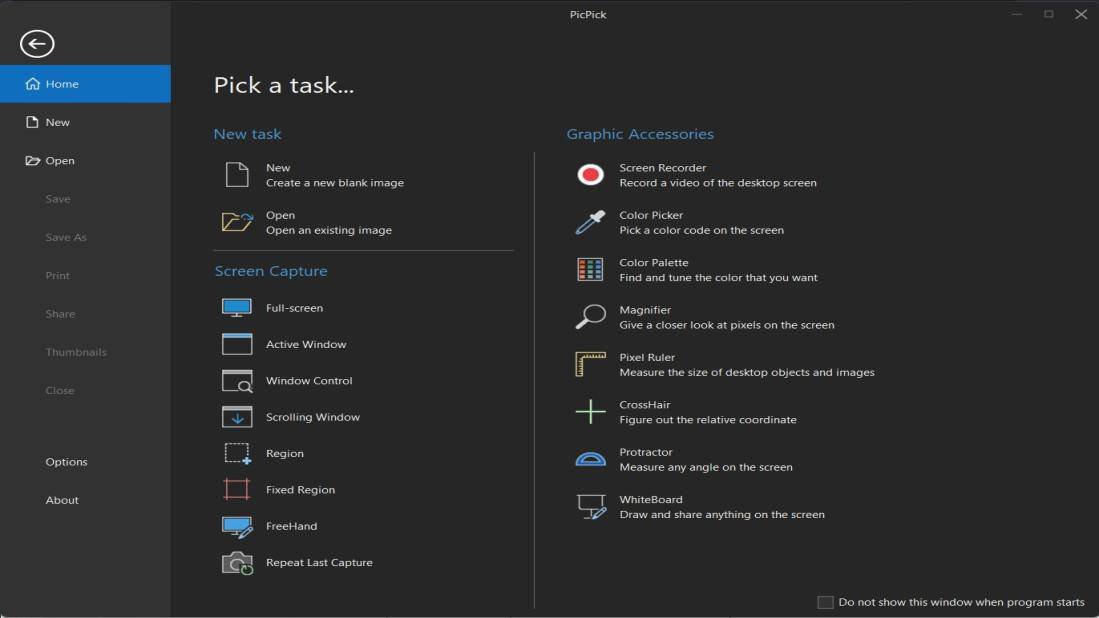
Advanced Screen Capture Tools
PicPick Professional For Windows main strength lies in its flexible screen capture system.
The software supports various capture modes, including:
- Full Screen Capture
- Active Window Capture
- Area Capture
- Fixed Area Capture
- Freehand Capture
- Scrolling Window Capture
Window Control Capture
The official documentation confirms support for scrolling windows, specific areas, delayed captures, and multi-monitor setups.
These tools make PicPick ideal for:
- Tutorials
- Documentation
- Technical support
- User interface demonstrations
- Website capture
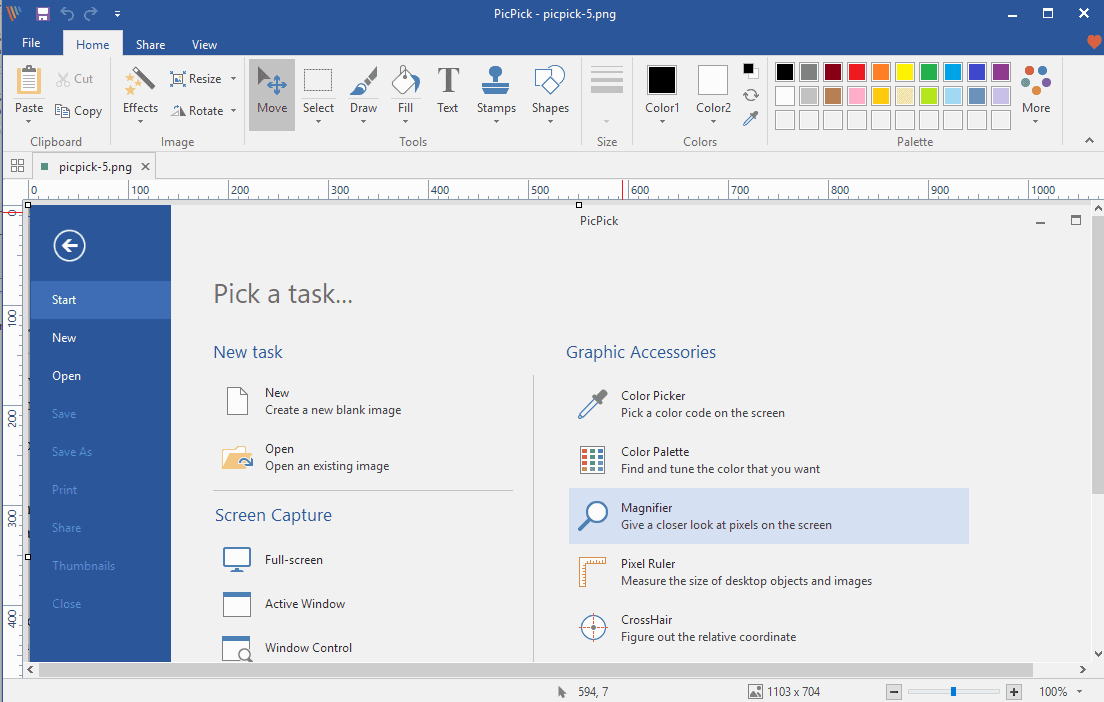
Built-in image editor
PicPick includes a built-in image editor with a ribbon interface.
- Users can:
- Annotate screenshots
- Add arrows and shapes
- Insert text
- Highlight elements
- Crop images
- Resize graphics
Scrolling window capture
One of PicPick’s most valuable features is scrolling window capture.
Users can capture:
- Entire web pages
- Large documents
- Chat logs
- PDFs
- Large application windows
Annotation and Highlighting Tools
PicPick offers numerous annotation features.
Available tools:
- Arrows
- Lines
- Bubbles
- Highlighting
- Text boxes
- Shapes
- Blur effects
- Watermarks
Graphic design utilities
Unlike traditional screen capture tools, PicPick integrates several graphic utilities.
The available tools are:
- Color Picker
- Color Palette
- Pixel Ruler
- Protractor
- Viewfinder
- Magnifier
- Whiteboard
Selection Tools and Color Palette
The color picker allows you to identify precise color values anywhere on the screen.
Supported Color Formats:
- RGB
- HTML
- C++
- Delphi
Measurement and Resolution Tools
PicPick Professional For Windows pixel ruler allows you to accurately measure elements on the screen.
Features:
- Horizontal measurement
- Vertical measurement
- Multiple resolution (DPI) support
- Pixel accuracy
- Unit conversion
What’s New in PicPick Professional 7.5?
Improved WebP Compatibility
Recent versions of PicPick now allow saving images in WebP format.
Benefits:
- Smaller file sizes
- Compatibility with modern web browsers
- Improved image compression
This simplifies workflows for web content creators and designers.
Improved Screenshot Stability
Improvements in this version:
- Window detection
- Reliable delayed capture
- Accurate control capture
- Capture behavior while scrolling
The official changelog includes fixes for capture and rendering issues.
Improved Windows 11 Compatibility
PicPick 7.5 includes improvements for:
- Windows 11
- High-resolution displays
- Multi-monitor setups
Adapting the user interface to modern hardware configurations
These updates improve usability on the latest hardware configurations.
Improved Performance and Responsiveness
Recent optimizations improve:
- Program startup speed
- Image editor responsiveness
- Multi-monitor rendering
- Large image handling
The official release notes mention improved loading performance and interface responsiveness.
Screen Recording Enhancements
The latest versions have improved:
- Full-screen recording
- Toolbar exclusion during recording
- Screen recording menu integration
- These updates improve video capture workflows.
System Requirements:
Minimum System Requirements
To use PicPick Professional For on Windows, users must meet the following minimum system requirements:
- Operating System: Windows 7, Windows 8, Windows 10, Windows 11.
- Processor: Intel or AMD processor
- RAM: 2 GB minimum
- Storage Space: Approximately 200 MB of available disk space
- Display: Standard screen resolution
The official download pages confirm compatibility with both 32-bit and 64-bit Windows systems.
System Requirements
For smoother editing and optimal use of multiple monitors, the following configuration is recommended:
- Operating System: Windows 10 or Windows 11
- Processor: Intel Core i5 or AMD Ryzen
- RAM: 4 GB or more
- Storage: SSD recommended
- Monitor: Full HD resolution or higher
Meeting the recommended specifications improves responsiveness when editing large images and performing advanced capture tasks.
Advantages and Disadvantages of PicPick Professional 7.5:
Advantages:
- Powerful annotation tools
- Lightweight and fast
- Minimal system resource consumption.
- Practical graphics utilities
- Multi-monitor support
- Intuitive interface
- Easy to learn.
- Portable version available
Disadvantages:
- Windows only
- No official support for macOS or Linux.
- Somewhat outdated interface
- The ribbon interface may seem outdated to some users.
- Basic screen recording features
- Dedicated recording tools offer more advanced video features.
Conclusion:
PicPick Professional 7.5 for Windows is a powerful yet lightweight software suite of graphics and screen capture utilities designed to maximize productivity. With its advanced capture modes, scrolling capture support, annotation tools, image editing features, graphics utilities, multi-monitor compatibility, and workflow automation capabilities, PicPick remains one of the most versatile screen capture applications on the market.





Leave a Reply