
CareUEyes Pro 2.5.1 For Windows Download

CareUEyes Pro 2.5.1 for Windows is a professional screen management and eye protection application designed to reduce eye strain, improve viewing comfort, and encourage healthier computer usage habits.
This software combines:
- Blue light filtering
- Brightness adjustment
- Screen dimming
- Reading modes
- Break reminders
- Concentration aids
- Screen protection tools
Unlike standard Windows brightness settings, CareUEyes Pro offers highly customizable screen optimization features, suitable for extended computer use. Whether you’re an office worker, student, programmer, designer, gamer, or professional who spends long hours in front of a screen, CareUEyes Pro 2.5.1 aims to improve your visual comfort and reduce digital eye strain on Windows systems.
Key Features of CareUEyes Pro 2.5.1 For windows:
Blue Light Filter Technology
One of the key features of CareUEyes Pro is its blue light reduction system.
According to the official website, the software helps reduce harmful blue light emitted by screens, which can lead to:
- Eye strain
- Dry eyes
- Blurred vision
- Sleep disturbances
- Headaches
The application allows users to adjust:
- Blue light intensity
- Color temperature
- Warmth levels
- Visual comfort presets
This contributes to a more comfortable viewing experience, especially at night.
Screen brightness control
CareUEyes Pro includes advanced brightness management tools.
Unlike Windows brightness controls, which are sometimes limited to laptops, CareUEyes also allows users to reduce the brightness of external monitors via software.
Users can:
- Reduce screen brightness below hardware limits
- Reduce glare
- Customize visual comfort
- Adjust multiple monitors independently
This is especially useful for working in dark environments.
Reading Mode
The software includes specialized reading modes designed for:
- Intensive Reading
- Programming
- Writing
- Office Work
- Web Browsing
Break Reminder System
One of the most convenient features is the built-in break reminder tool.
CareUEyes Pro promotes better computer habits by reminding users to:
- Rest their eyes
- Stretch their eyes
- Take short breaks
- Follow the 20-20-20 rule
- Users can customize:
- Reminder intervals
- Break duration
- Notification style
- Full-screen reminders
Preset Display Modes
CareUEyes offers several preset display modes, such as:
- Normal Mode
- Office Mode
- Game Mode
- Movie Mode
- Reading Mode
- Night Mode
Multi-Monitor Support
The software supports multi-monitor setups.
Users can:
- Adjust brightness independently
- Configure separate monitors
- Apply unique settings to each monitor
Improved Focus and Productivity
CareUEyes Pro also helps improve productivity through:
- Focus Reminders
- Reduced Distractions
- A Comfortable Visual Environment
- Reduced Eye Strain
Customizable Color Temperature Adjustment
The software allows for precise control of the following:
- Warm colors
- Cool colors
- Screen tone
What’s New in CareUEyes Pro 2.5.1 For Windows?
Improved Windows Compatibility
Version 2.5.1 improves compatibility with:
- Windows 10
- Windows 11
- Multi-monitor setups
- Modern high-resolution displays
This ensures smoother operation on current Windows hardware.
Greater Brightness Adjustment Stability
Recent updates improve:
- Brightness management for external displays
- Brightness synchronization
- Smoother screen transitions
These changes contribute to a more stable user experience.
Improved User Interface
The latest versions optimize the interface with:
- Clearer menus
- Simplified profile management
- Faster access
- Simplified controls
This improves usability for both novice and advanced users.
Performance Optimizations
The latest updates include:
- Reduced CPU usage
- Faster startup
- Improved background efficiency
- Enhanced responsiveness
Bug Fixes and Stability Improvements
Version 2.5.1 also includes:
- Minor bug fixes
- Improved callback functionality
- Improved screen detection
- Greater screen compatibility
These improvements enhance reliability in everyday use.
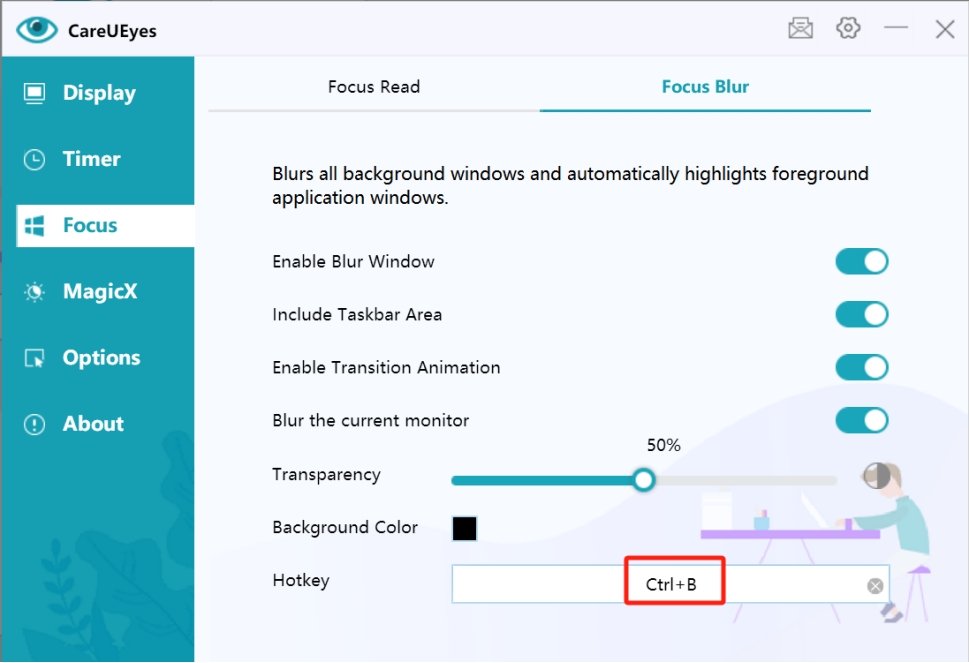
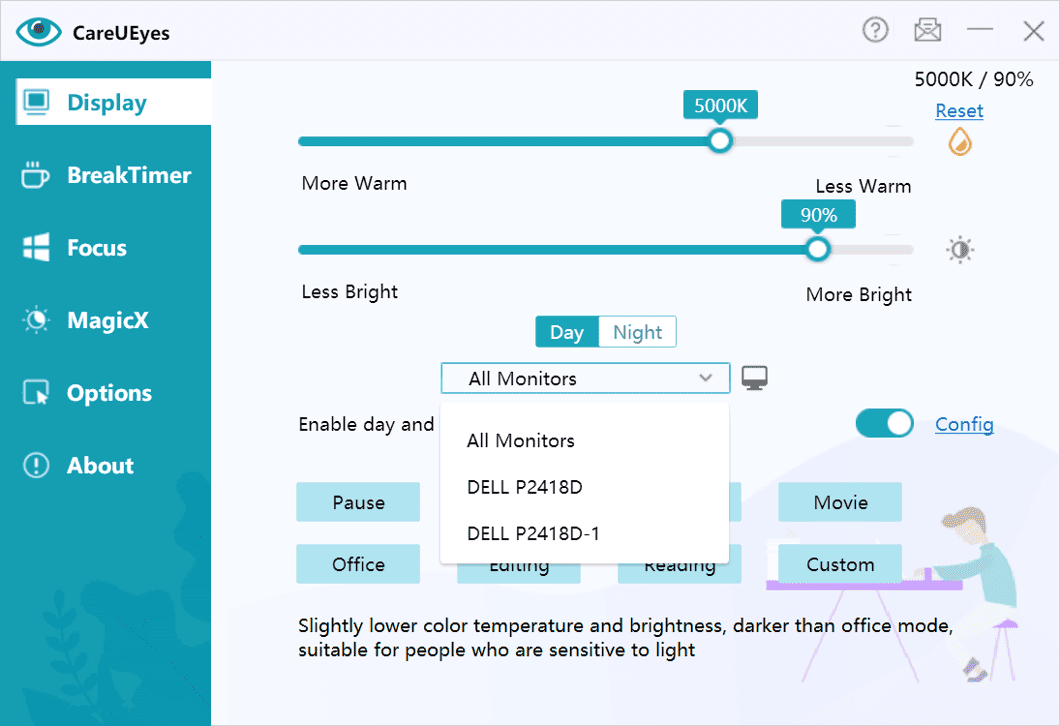
Screenshots:
System Requirements
Minimum System Requirements
To use CareUEyes Pro 2.5.1 correctly on Windows, the minimum system requirements are as follows:
- Operating System: Windows 7, Windows ,Windows 10, Windows 11
- Processor: Intel or AMD processor
- RAM: 1 GB minimum
- Storage Space: Less than 100 MB of available disk space
- Display: Standard monitor or laptop screen
The official website confirms broad compatibility with various versions of Windows. Official CareUEyes Website
System Requirements
For an optimal experience, the following configuration is recommended:
- Operating System: Windows 10 or Windows 11
- Processor: Intel or AMD Multi-Core Processor
- RAM: 4 GB or more
- Monitor: IPS or High-Resolution Monitor
- Multi-Monitor Setup: Recommended for demanding users
Following the recommended configuration ensures smoother screen management and optimal multitasking performance.
Advantages and Disadvantages of CareUEyes Pro 2.5.1:
Advantages:
Effective Blue Light Reduction
The software helps reduce eye strain during long sessions.
Excellent Brightness Control
Support for dimming external monitors is very convenient.
Optimal Performance
The application uses minimal system resources.
Customizable Profiles
Users can precisely adjust settings according to their preferences.
Multi-monitor compatibility
Ideal for professional workstations.
Helpful break reminders
Promotes better screen usage habits.
Simple and intuitive interface
This software is easy to learn and set up.
Disadvantages:
Limited advanced productivity features
Primarily focuses on eye protection rather than comprehensive productivity management.
Some features overlap with Windows Night Mode
Recent versions of Windows already include basic blue light filters.
Basic interface design
The interface prioritizes simplicity over modern aesthetics.
Slight compatibility variations
Brightness adjustment behavior may vary depending on the monitor.
Conclusion:
CareUEyes Pro 2.5.1 for Windows is a lightweight and effective eye protection application designed to reduce digital eye strain and improve comfort when using a screen. With advanced blue light filtering, external monitor brightness control, reading modes, break reminders, scheduling tools, and customizable color temperature settings, this software offers a practical solution for users who spend long hours in front of a computer.





Leave a Reply